


Email - Fast & Secure Mail
4.524.55K Reviews
App Specs
- Version
- 26.7.0
- Updated On
- License
- Free
- Downloads
- 10,000,000+
- Developer
- Edison Software
- Categories
- Productivity
- Platform
- Android, iOS
Screenshots

 Analysis by AppCompare
Hey there, fellow app enthusiasts! Today, I’m diving into the world of email management with an app that promises to make your life a whole lot easier. Let’s talk about Email - Fast & Secure Mail. If you’re anything like me, you probably have multiple email accounts and keeping track of them all can be a bit of a nightmare. This app aims to simplify that chaos, and I’ve taken it for a spin to see if it lives up to the hype.
Why a quick first week can be persuasive
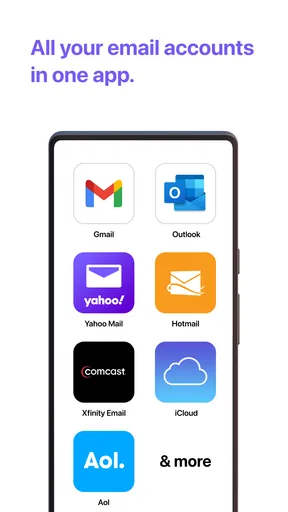
The appeal is easiest to understand when several addresses compete for attention. Rather than treating Gmail, Yahoo Mail, Hotmail, AOL, and Outlook as separate destinations, Edison Software’s app brings those kinds of accounts into one mobile email experience. I can see the value straight away: a personal message and a work update are both visible without my having to remember which mailbox to open first.
That convenience is also a useful test before making this your default. Add the accounts you genuinely check, then spend a few ordinary days reading and replying as you normally would. If the shared view reduces the small delays between tasks, it may fit your routine. If you mainly use one address, the benefit is smaller, and a provider’s own app may feel more direct.
First Impressions
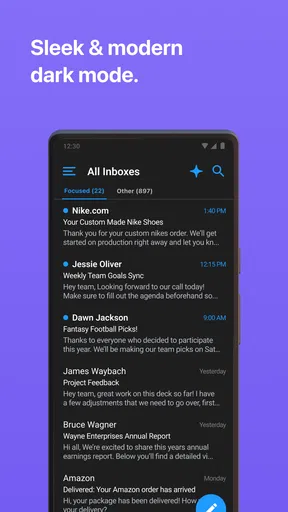
The first thing you’ll notice when you open Email - Fast & Secure Mail is its clean and intuitive interface. Everything is laid out in a way that just makes sense, which is great because who wants to spend time figuring out how to use an email app? It’s got a modern look without being too flashy, so it feels like a perfect blend of style and function.
Easy Setup
Setting up the app is a breeze. I was able to add my Gmail, Yahoo, and work email accounts in just a few taps. It supports a wide range of services, so no matter what you’re using, you’re covered. I love that it even offers support for lesser-known email providers, which is a thoughtful touch.
For a real-world setup, I’d add accounts in a deliberate order: start with the address that receives the most daily mail, then bring in secondary and work inboxes. That makes it easier to judge whether a combined inbox helps or simply adds more noise. Before making the app part of a work routine, send a test reply from each address and check that the correct sender account is selected. It is a simple habit, but it helps prevent the awkward mistake of answering a work thread from a personal address.
This kind of consolidation is most useful for people who switch between roles during the day: a freelancer tracking client messages, a student balancing school and personal mail, or someone coordinating family plans while keeping a separate work account. It is less compelling if your employer requires a particular managed mail app or if you prefer every account to stay in its own clearly separate environment.
Worth Reading Before You Choose

EA SPORTS FC Mobile 26 Is a Bigger Football Game, but It Takes Time

Flipboard Shows What News Apps Must Do Beyond the Feed

Switching to Android Auto Means Rethinking Your Driving Routine

Google Calendar Makes a Crowded Week Easier to Manage

Ludo King Makes the Most of the Minutes Between Plans

Baby Panda World Brings Quick Play to Modern Phones, but Its Game Library Feels Busy
Features That Stand Out
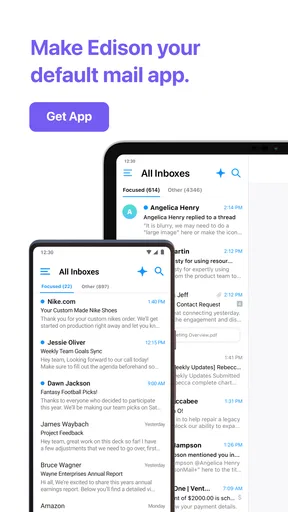
Now, onto the juicy stuff—the features. One of my favorites is the unified inbox. It’s a game-changer. Instead of flipping between accounts, you get all your emails in one place. It saves so much time and is perfect for someone juggling multiple roles or projects.
The unified view is convenient, but I wouldn’t treat it as a replacement for knowing which account owns a conversation. When a message matters, I check the sender address and account context before replying or filing it. That small pause is especially worthwhile when a client, school, or family member uses similar subject lines. A combined inbox reduces app switching; it does not remove the need to keep identities and responsibilities straight.
A practical daily routine is to use the shared inbox for quick triage, then visit an individual account when handling a sensitive or time-critical thread. For example, during a commute I might scan for anything that needs attention, leave complicated replies for later, and then work through the relevant mailbox when I have time to focus. This keeps the convenience of one overview without turning every message into an interruption.
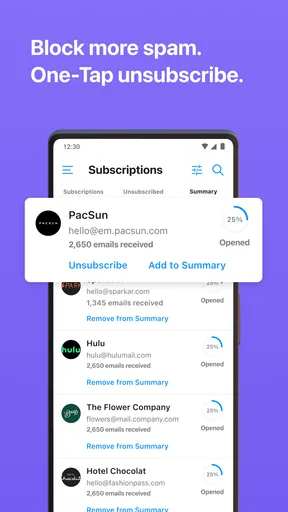
Security is a big concern these days, and this app doesn’t skimp on it. With end-to-end encryption, you know your emails are safe. It also has an automatic spam filter that works like a charm, keeping annoying junk mail at bay.
Email security is also a reason to be thoughtful when choosing an app that brings multiple accounts together. I would not assume that a client app changes the protections or policies of the email provider behind an account. If you handle confidential information, check the security expectations that apply to that account and use the provider or organization-approved setup when required. The app is better viewed as a way to manage mail than as a substitute for good account security habits.
Performance and Speed
True to its name, the app is fast. Email notifications are instant, and it doesn’t lag when loading even the most cluttered inboxes. It’s lightweight, so it doesn’t drain your battery or hog your data, which is a huge plus for anyone on the go.
Notifications are where the convenience of a multi-account app can turn into fatigue. I’d begin with alerts enabled only for the addresses where a quick response matters, then adjust the rest after seeing how often they interrupt the day. If every mailing list and low-priority account competes for attention, the unified setup can make email feel busier rather than simpler. A quieter notification routine often does more for everyday usefulness than checking each inbox more often.
Customization Options
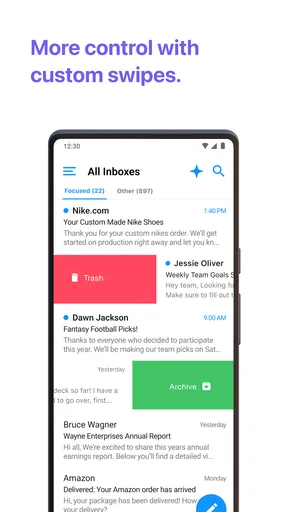
I love a bit of personalization, and this app lets you tweak the interface to suit your style. Whether it’s changing themes or adjusting notification settings, it’s nice to have options to make the app feel truly yours.
For lasting value, I’d treat customization as maintenance rather than a one-time setup. Keep the accounts you still use, reconsider alerts when your schedule changes, and remove an address from the routine if it no longer deserves daily attention. A mail app can only simplify life if its account list reflects real responsibilities; otherwise the combined view becomes another place to sort through old commitments.
One useful trade-off to consider is the difference between a combined inbox and separate provider apps. The combined view is handy when you move between accounts constantly. Separate apps can be preferable when you rely on provider-specific tools, need a strict boundary between personal and work mail, or simply want fewer accounts visible at once. I would try the shared workflow for a week, but keep the alternative that best suits any account with special requirements.
Room for Improvement?
While Email - Fast & Secure Mail does a lot right, there are a few areas where it could improve. For instance, the search function could be more robust. If you’re looking for an obscure email from months ago, it might take a bit of digging. Also, while the app is mostly glitch-free, I encountered a minor bug when trying to archive emails. Nothing major, but worth mentioning.
Search matters most once an inbox becomes an archive. If you often need to retrieve a particular receipt, an old attachment, or a thread with a vague subject, try a few searches early rather than waiting until the information is urgent. I’d also verify that important messages are filed where I expect after archiving. That is a sensible check whenever an email app is new to you, and it is especially useful if several accounts are being handled together.
The app is not automatically the best choice for everyone who owns multiple addresses. People who need a highly specialized workflow, strict organizational controls, or a search experience they already trust may be happier with their provider’s own client or an approved workplace option. Likewise, if you rarely switch accounts, adding another layer between you and a single inbox may not solve a problem you actually have.
Another thing to note is that while the free version is quite comprehensive, there are some premium features locked behind a paywall. So, if you’re looking to unlock the app’s full potential, you might need to shell out a few bucks.
The app is free to download, and optional in-app purchases range from about a dollar to around $130 per item. I’d use the free experience first and decide whether any paid feature addresses a recurring need, rather than paying because a feature sounds useful in theory. That approach makes sense for an email tool: its value comes from being dependable in ordinary daily use, not from collecting options you may rarely open.
It is a productivity app from Edison Software, rated for everyone and compatible with Android 7.0 or later. Its current version is 1.68.01. The app has a 4.5 average from around 310,000 ratings and more than 10 million installs, which suggests a well-established audience, though popularity alone cannot tell me whether its workflow will suit your accounts.
Final Thoughts
Overall, I’m pretty impressed with Email - Fast & Secure Mail. It’s streamlined, user-friendly, and packed with features that genuinely make managing email a less daunting task. Whether you’re a busy professional, a student, or just someone who wants to keep their digital life organized, this app is definitely worth a try.
For me, the deciding question is whether it still earns a place after the novelty of combining inboxes wears off. Its recurring value comes from saving small bits of attention: checking several accounts in one place, replying from the right address, and keeping alerts tied to messages that matter. If those habits become easier, the app has a practical role beyond the first few days. If you spend more time sorting the shared view or dealing with a workflow that your provider’s app handles better, switching back is a reasonable choice.
So, if you’re ready to take control of your inbox, head over to your app store and give it a download. You might just find it’s the email solution you’ve been waiting for!
Pros
- User-friendly interface with easy navigation.
- Supports multiple accounts seamlessly.
- Quick and efficient email syncing.
- Advanced security features for privacy.
- Customizable notifications and themes.
Cons
- Lacks integration with some third-party apps.
- Occasional syncing delays reported.
- Limited storage for attachments.
- No offline access to emails.
- No built-in calendar feature.
FAQs for Email - Fast & Secure Mail
What features does Email - Fast & Secure Mail offer?
Email - Fast & Secure Mail provides a streamlined experience with features such as real-time notifications, customizable themes, and multi-account support for various email providers. It also includes advanced security measures like encryption and two-factor authentication to keep your communications safe and private.
Is Email - Fast & Secure Mail compatible with all email providers?
Yes, the app is designed to be compatible with most major email providers, including Gmail, Yahoo, Outlook, and more. It supports both IMAP and POP3 protocols, ensuring seamless integration and accessibility across various platforms, making it highly versatile for users with multiple email accounts.
How secure is Email - Fast & Secure Mail?
Security is a top priority for Email - Fast & Secure Mail. The app includes end-to-end encryption for emails, ensuring that your messages remain private. Additionally, it offers two-factor authentication for an extra layer of protection, safeguarding your data from unauthorized access.
What customization options are available in Email - Fast & Secure Mail?
The app offers a variety of customization options to enhance user experience. You can choose from different themes, adjust notification settings, and organize your inbox with customizable folders. This flexibility allows users to tailor the app to their personal preferences and workflow needs.
Are there any subscription fees for Email - Fast & Secure Mail?
Email - Fast & Secure Mail offers a free version with basic features. There is also a premium subscription available, which provides additional features such as ad-free experience, priority support, and enhanced security options. Users can choose the plan that best suits their needs and budget.


